The same data.
Collected again and again.
Multiple tools ask the same controller for the same values. Every new consumer can add another polling loop and communication demand.
Industrial data. Without the tangle.
Connect once. Use PLC data everywhere.
One shared source for your controller data. Less duplicate polling. Less repeated integration. A consistent view across your applications.
OPC UA client & server · MQTT · Built-in historian
Browser dashboard · Communications diagnostics
Data Rules Everything Around Me.
One shared source. Every application.The problem
A historian needs production data. MES wants machine states. Another team adds an OEE dashboard. Then comes cloud analytics.
Each project makes sense. Together, they create a growing web of direct connections, duplicate polling and integration work.
Multiple tools ask the same controller for the same values. Every new consumer can add another polling loop and communication demand.
Connection settings, tag mappings and driver knowledge get repeated across applications. Changes become a coordination job.
Independent polling and mappings leave applications with different snapshots of the same equipment. TagHarbour shares current values, timestamps and quality from one managed source.
The TagHarbour approach
TagHarbour acquires controller data once into a shared current-state cache. OPC UA and MQTT serve downstream applications, while the built-in historian and browser dashboard give your team history and visibility in the same gateway.
Every application manages its own route to the controllers.
A shared acquisition path. Multiple ways to use the data.
Manage acquisition in one place, with update rates suited to the information your applications need.
Give downstream systems a shared view of values, timestamps and data quality.
Connect new consumers to the shared layer, keeping routine data access away from direct controller connections.
Included with TagHarbour
Keep the systems you already use. Give them a shared data foundation—and give your team the tools to see what is happening.
Read and write through Modbus, Siemens S7, Allen-Bradley EtherNet/IP and OPC UA. Share acquired values with downstream applications through OPC UA and MQTT.
Build bespoke equipment screens with reusable water and marine SVG components. Keep the operator dashboard separate from the editor, with live values, alarm colours and connection-loss indication.
See connection health and data quality alongside your plant data. Find communications problems before chasing the wrong application.
Overlay multiple tags, choose left and right scales, explore time ranges and export CSV. Record periodically or on change, with retention and a maximum database size.
Organise tags by factory, vessel, machine and equipment. Stable tag identities keep dashboards connected when labels or asset names change. Configure in Excel or the browser.
Add Boolean buttons and numeric value writers. Writes require sign-in and a writable tag; configured limits and an audit trail accompany commands. Readback comes from the controller.
Configure high, low and Boolean alarms, delays, hysteresis and latching. Display an individual alarm’s active state as a read-only signal, alongside equipment values.
Use your own asset model for PLC tags. For OPC UA sources, inherit supported device metadata where spreadsheet fields are blank, or overlay your own names and hierarchy. Refresh source metadata on restart.
Browser dashboard
See equipment states, levels, pressures and flows together in TagHarbour’s browser dashboard.
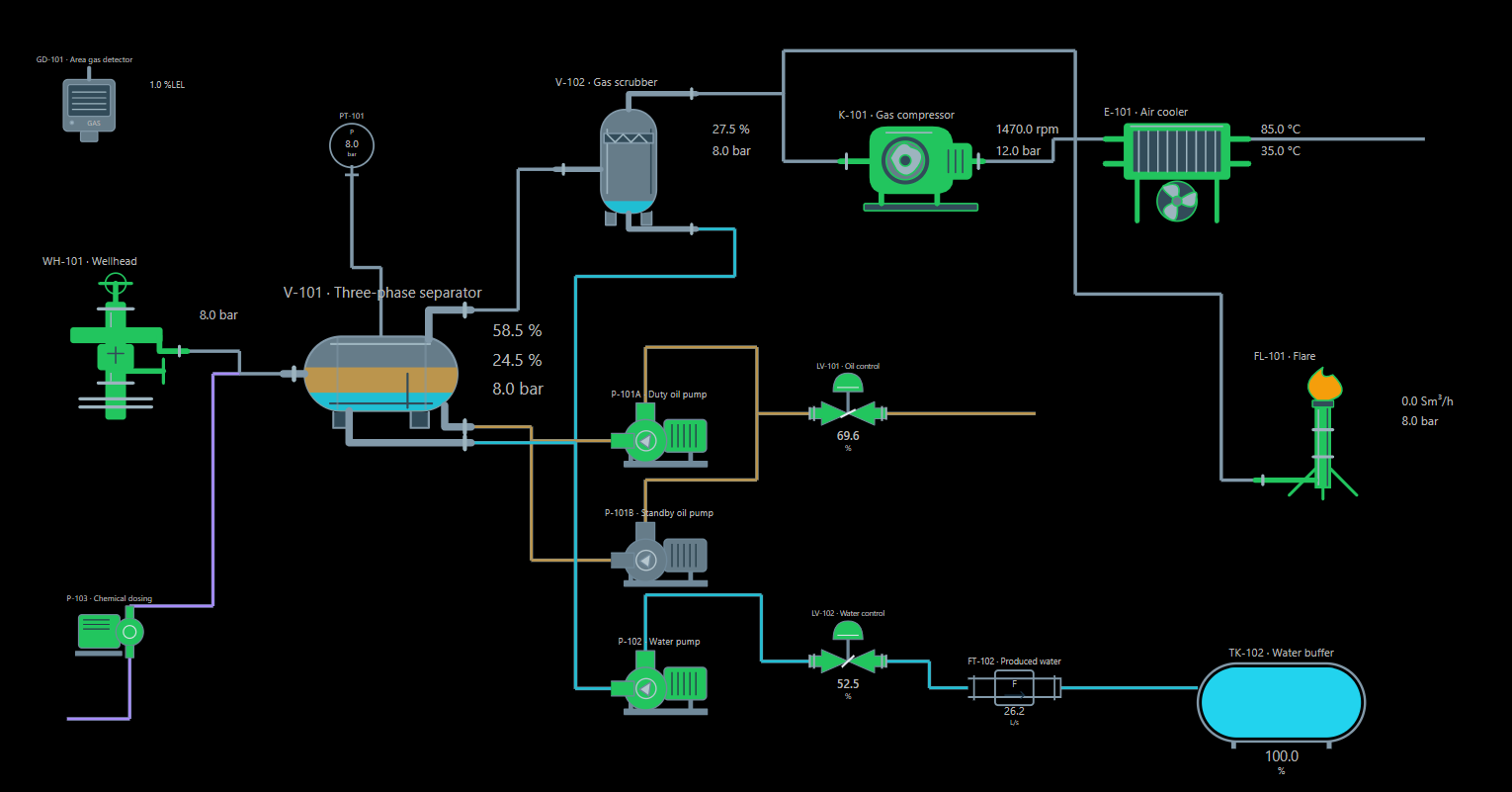
Built for the people doing the integration
Give dashboards, history and production applications a consistent source. Manage acquisition and diagnose communications in one place.
Centralise controller connections and tag configuration. Add the next application without rebuilding the same data acquisition work.
Organise tags around assets with stable identities, independently of PLC connections. Give customer systems a consistent way to access machine data.
Straightforward gateway pricing
Size your data model around the plant—not a per-tag licensing tier.
software-only per gateway installation
OPC UA, MQTT, built-in historian, browser dashboard and communications diagnostics.